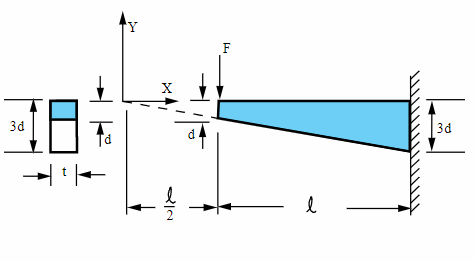
Laterally loaded tapered support structure (Quad plane element)¤
This live script is written as a guided walkthrough for a verification benchmark. It compares a known structural response with the result produced by the OpenSeesMatlab workflow. Read the text cells first, then run each code cell in order so that the variables, model state, and recorded results are available for the later sections.
This section creates the finite-element idealization used by the rest of the example. Check the dimensions, tags, and connectivity here before moving on.
%% Clean modelops.wipe();ops.model('basic','-ndm',2,'-ndf',2);%% Material and thicknessE=30e6;% psinu=0.0;t=2.0;% inmatTag=1;ops.nDMaterial('ElasticIsotropic',matTag,E,nu);%% Mesh controlnElem=100;% number of quad elements along the beam lengthnNodePerEdge=nElem+1;%% Geometry% Top edge: from (25, 0) to (75, 0)% Bottom edge: from (25, -3) to (75, -9)xTop=linspace(25,75,nNodePerEdge);yTop=zeros(1,nNodePerEdge);xBot=linspace(25,75,nNodePerEdge);yBot=linspace(-3,-9,nNodePerEdge);% Node numbering:% top : 1 ~ nNodePerEdge% bottom : nNodePerEdge+1 ~ 2*nNodePerEdgefori=1:nNodePerEdgeops.node(i,xTop(i),yTop(i));endfori=1:nNodePerEdgeops.node(nNodePerEdge+i,xBot(i),yBot(i));end%% Elements% Counterclockwise ordering:% [bottom-left, bottom-right, top-right, top-left]conn=zeros(nElem,4);fore=1:nElemnBL=nNodePerEdge+e;nBR=nNodePerEdge+e+1;nTR=e+1;nTL=e;conn(e,:)=[nBL,nBR,nTR,nTL];ops.element('quad',e,nBL,nBR,nTR,nTL,t,'PlaneStress',matTag);end%% Boundary conditions% Fixed end at x = 75 -> top last node and bottom last nodetopFixed=nNodePerEdge;botFixed=2*nNodePerEdge;ops.fix(topFixed,1,1);ops.fix(botFixed,1,1);%% Load% Concentrated vertical load at top-left nodeops.timeSeries('Linear',1);ops.pattern('Plain',1,1);ops.load(1,0.0,-4000.0);
This section creates the finite-element idealization used by the rest of the example. Check the dimensions, tags, and connectivity here before moving on.
This section configures and runs the analysis. The solver, constraints, convergence test, and step size should be read together because they control numerical robustness.
The following commands carry out this step of the workflow. Run this cell after the previous sections so the required variables and model state already exist.
1
nodeResp=opsMAT.post.getNodalResponse("myODB");
123456789
opts=opsMAT.vis.defaultPlotNodalResponseOptions;opts.fixed.show=true;opts.surf.showEdges=false;opts.deform.show=true;opsMAT.vis.plotNodalResponse(nodeResp,respType="disp",stepIdx="absMax",respComponent="UY",opts=opts);colormap("jet")axisofftitle("Displacement Along y-Direction")
vm=planeResp.StressMeasureAtNode.vonMises;% Von Misessxx=planeResp.StressAtNode.sxx;% sxxnodeTags=planeResp.nodeTags;
Find nodes closest to (75,0) and (50,0)
1 2 3 4 5 6 7 8 91011121314151617181920
numNode=2*nNodePerEdge;coords=zeros(numNode,2);fori=1:nNodePerEdgecoords(i,:)=[xTop(i),yTop(i)];endfori=1:nNodePerEdgecoords(nNodePerEdge+i,:)=[xBot(i),yBot(i)];endfixedNode=localFindNearestNode(coords,[75,0]);midNode=localFindNearestNode(coords,[50,0]);fixedIdx=nodeTags==fixedNode;midIdx=nodeTags==midNode;% get stresssxxFixed=sxx(:,fixedIdx);% nStep * 1vmMid=vm(:,midIdx);% nStep * 1mid_stress_osp=max(vmMid);fixed_end_stress_osp=max(sxxFixed);
123456
%% Reference values from ANSYS exampletarget_mid=8333.0;% theory valuetarget_end=7407.0;mapdl182_mid=8163.66;% only 6 elementsmapdl182_end=7151.10;
Comparing the results, note that ANSYS only used 7 elements, so the results will be somewhat worse. However, if OpenSees also uses 7 elements, the results are surprisingly poor!